MeluMimi Lyra
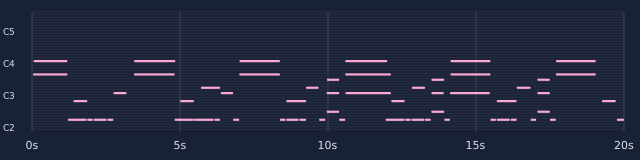
59 detected notes
 MeluMimi
Listen, compare, then edit
Hear an isolated guitar or bass part, then compare the MIDI produced by each of MeluMimi's four general models from exactly the same input. Play the result with its MIDI instrument settings or a common piano sound, then download the file for closer inspection in your editor.
Start without signing in. Check the tool for your current trial credits, file limits and the quote before conversion.
Both cases use the same 00:30–00:50 passage of Stumble Bee's Lay down the law (CC0 1.0). The inputs are the first 20 seconds of MeluMimi's previously published guitar and bass separation outputs. They are extracted parts of a mixed song; residual sound and separation artifacts remain possible.
The note count describes the output; compare the musical phrase to judge what needs editing.
59 detected notes
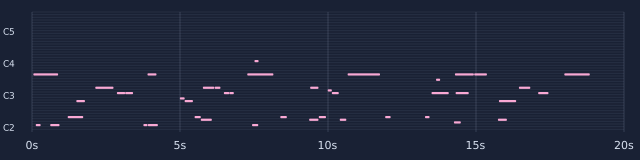
43 detected notes
0 detected notes
No usable notes were produced for this input. A silent audio player would not represent a successful conversion.
Try this model77 detected notes
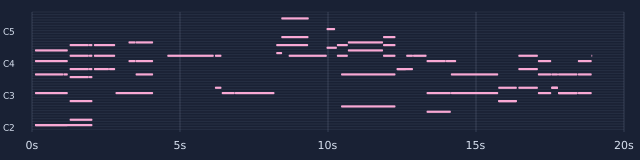
37 detected notes
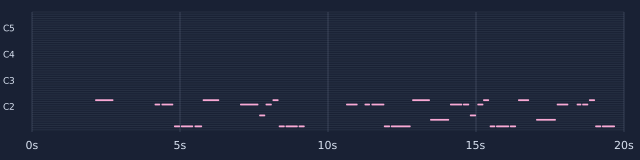
35 detected notes
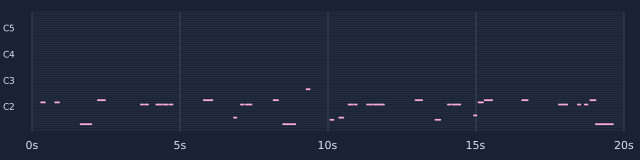
14 detected notes

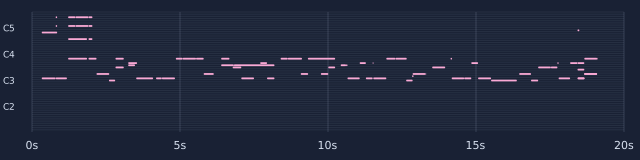
78 detected notes
Recording: Stumble Bee — Lay down the law. Todd Olson: guitar and vocals; Mike Gardner: bass; Paul Wheeler: drums. The source is marked CC0 1.0 by Free Music Archive. The recording artists do not endorse MeluMimi. These are local examples of the current product models; online processing time and accuracy depend on the input.
Download the case manifest and file hashesOn 7 October 2026, each extracted input was cropped to its first 20 seconds and decoded to mono 44.1 kHz PCM16 using the product's audio-preparation step. All four current product adapters ran locally on CPU. MIDI metadata was removed by the product's privacy step; no notes were manually added, removed, quantized or corrected. Every model outcome is shown, including an input for which no notes were produced.
The two playable previews use the same generated MIDI: one follows its General MIDI instrument settings, and the other assigns all notes to piano. Both previews are rendered locally and limited to the 20-second input length; MIDI downloads retain the actual note lengths. A different synthesizer can change the tone. Check melody, bass movement, missing or extra notes, start times and note lengths. These examples have no synchronized reference MIDI or accuracy score.
Upload a clear instrumental recording to Audio / Video to MIDI and select General audio to MIDI. Choose one model or compare several independent outputs after reviewing the quote. For a crowded mix, first extract a supported instrument in the stem separator, listen to that part, download it and upload it to the MIDI tool. Import the result into a compatible editor, assign a sound and refine the notes.
The source is a publicly licensed recording by Stumble Bee. For an authorized Suno export or other rendered audio, the same model-comparison and editing workflow applies. The case is not presented as a Suno output.
Compare the audible phrase and inspect the notes. More notes may include unwanted detections; fewer notes may miss a part. No reference-note benchmark was available for this passage.
MIDI stores musical instructions. Its sound depends on the instrument assigned during playback. Keep the original audio or separated stem when you need the recorded tone.